Skip to content
Total items in cart: 0
5.0 ⭐ Google Rating
Established 2015 - 10,000 + orders
30 Day Peace of Mind Returns
Mirage V2026 Master Edition Epson

Mirage V2026 Master Edition Epson

Single Seat
$859.00 AUD
Skip to product information
Mirage V2026 Master Edition Epson

Mirage V2026 Master Edition Epson

$859.00 AUD
In stock
Licence Type
Payment methods
  • American Express
  • Apple Pay
  • Google Pay
  • Mastercard
  • PayPal
  • Shop Pay
  • Union Pay
  • Visa

Free Shipping on orders $75 and over (Australia wide)

30 Day Peace of Mind return policy

Details

Product Features:

  • NEW Print Templates,Template Editor and Template Browser, Easier Layout Option.
  • NEW tools for image editing,New print mode “Only Black Ink”,Additional print marks
  • Real performance, no hidden costs
  • Perfect print quality, fast and efficient
  • Colour Management, Easy as never before
  • Mirage allows printing to multiple printers at the same time
  • Mirage preview window shows exact print results
  • Full 16-bit support of print data
  • Real 64-bit structure even on Mac
  • Improved workflow for droplets

Mirage Master Edition Epson - includes all FineArt printers up to 64" (162,6 cm) print width

  • Epson Stylus Pro 3xxx, 4xxx, 7xxx, 9xxx & 11xxx
  • Epson Stylus Photo R2880 & R3000, P700, P900, XP-15000, P400 (nur Windows 10, 11)
  • Epson SureColor T3000, T3100, T3200, T3400, T5000, T5100, T5200, T5400, T7000, T7200, T5400M, SC-T3100x, SC-T 3700D, SC-T-3700E,
  • Epson SureColor P600 & P800, P50xx, P60xx, P70xx, P80xx & P90xx, P100xx, P200xx, P7500, P9500, SC-P8500D, SC-T7700D, SC-P 8500 DL, SC-P6500D, SC-P6500E
  • Epson SureColor SC-F500(nur Windows 10, 11), SL-D500

Mirage single seat license

  • Using the software Mirage  on one Computer.
  • Requires an active account on the Mirage license server and a connection to the Internet.

Mirage 5 Floating-License

  • Using the software Mirage  on multiple computers, but only on one computer at a time.
  • Requires an active account on the Mirage license server and a connection to the Internet.

 Additional workstations

  • If you want to use Mirage 5 on more than one computer at the same time, you will need additional workstations.


Get a first taste of what Mirage  has to offer.

1. Print templates
2. Template Editor
3. Free layout of files on the spread
4. Clear program interface
5. Improved print preview
6. File & Templates browser
7. Multiple print jobs at the same time
8. “Undo/Redo” function
9. Improved handling/placement of embedded logos
10. New tools for image editing
11. New print mode “Only Black Ink”
12. Settings option “Simulation”
13. Additional print marks
14. Support for current operating systems


Still using Mirage 4?
Visit our shop and upgrade your license to the new Mirage 5.
Please note that there is a charge for the upgrade.
Download our PDF “What is new in Mirage 5?”


1) Print templates

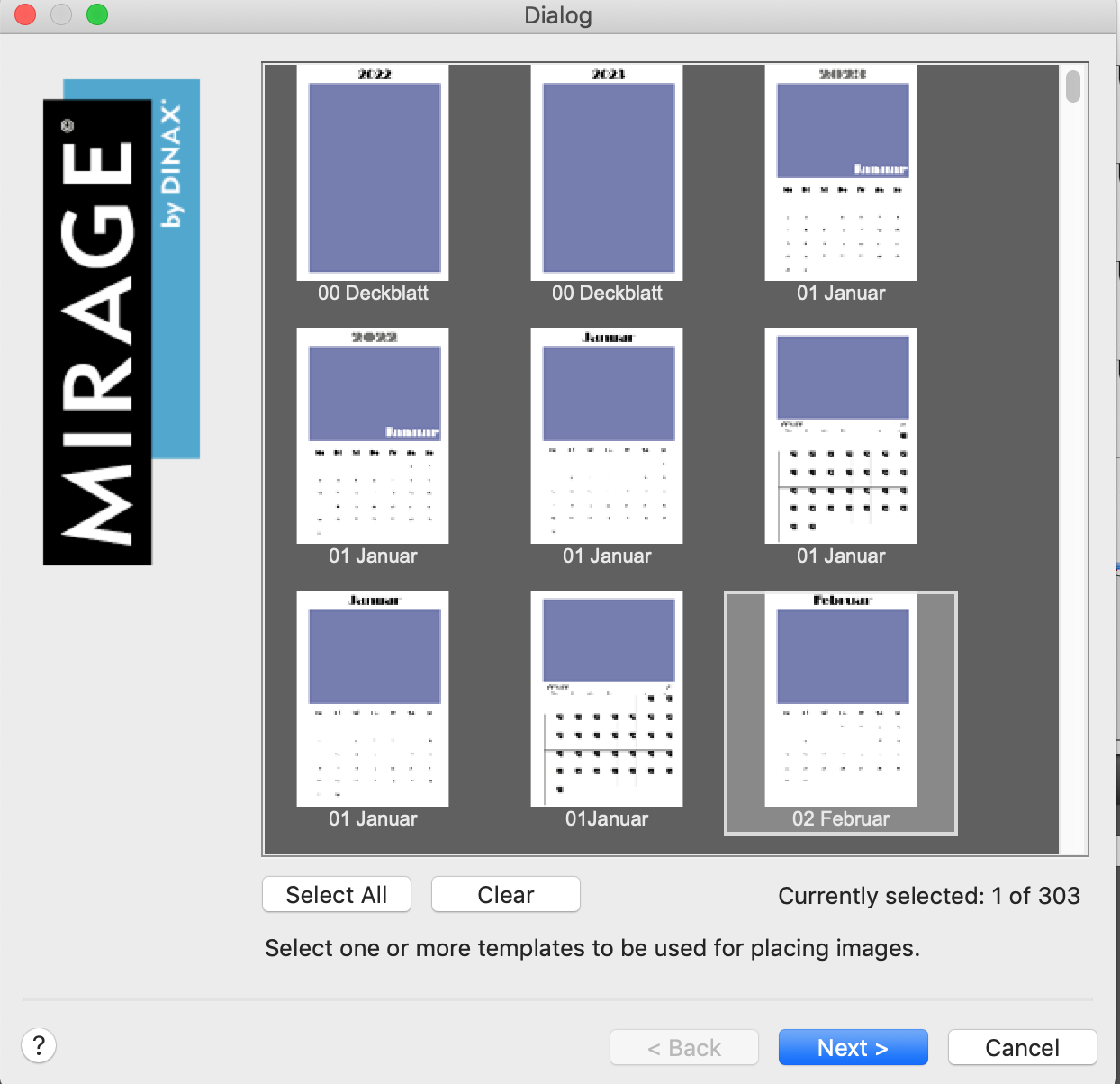
Templates are elements designed specifically to be filled with images. Templates contain slots. A slot is a square area in which an image can be placed. The images can be freely rotated and placed within the slots. Slots can overlap in part or in full, and be sorted in their position upwards or downwards as required.

Each slot is automatically assigned a number. Slots can be automatically filled with images in the Template’s browser as required. The same number can be assigned to multiple slots. If there are multiple slots with the same number and an image is dragged into one of these slots, all slots with the same number
will be automatically filled with the same image – ideal, for example, for passport and application photos.
“Masks” give users a number of image design options.
Masks are pixel or vector images that describe which parts of the slots will be printed. Of course, print layouts you create yourself can be converted
into “templates” and saved.

Mirage 5 features a number of different templates.


2) Template Editor

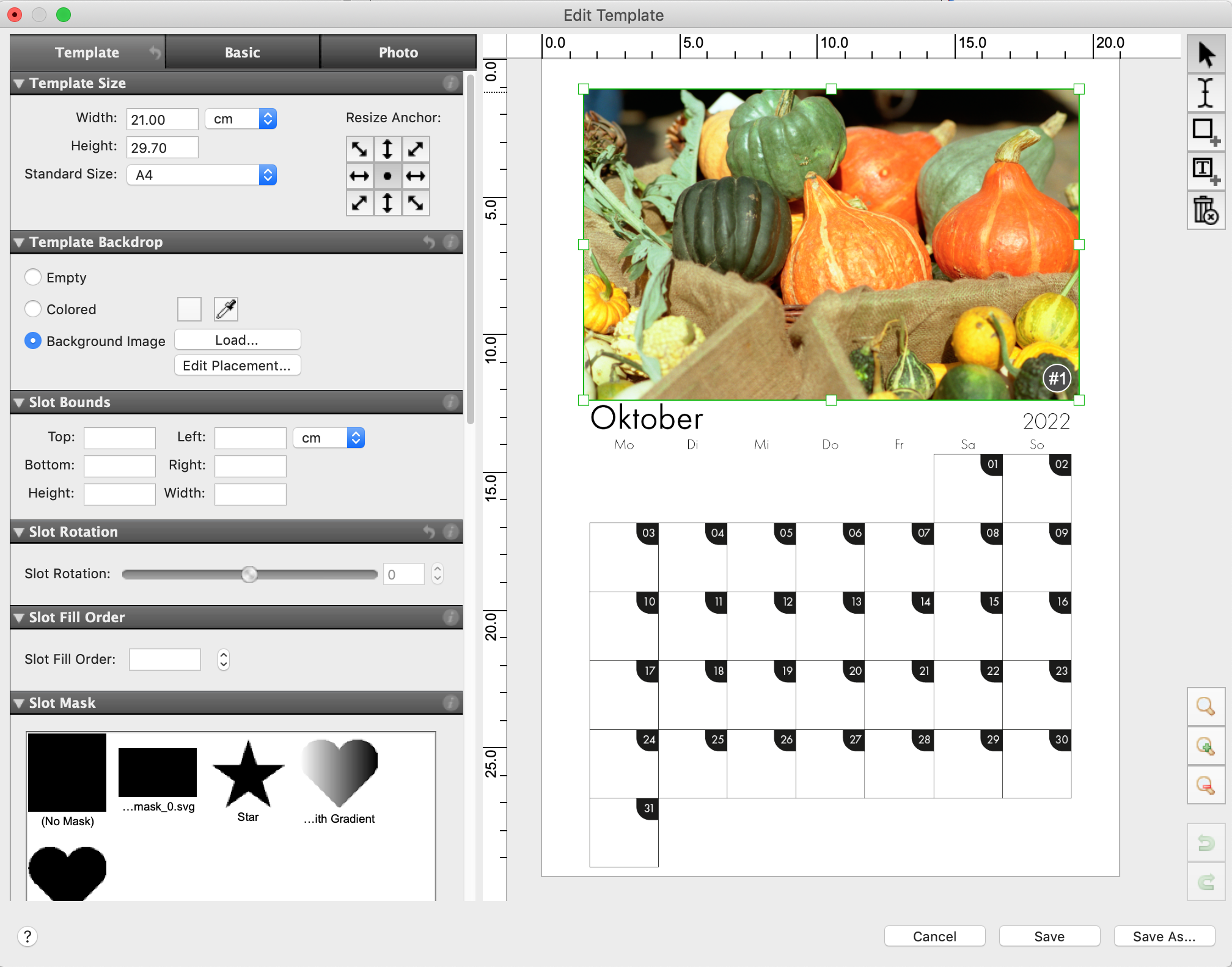
You can use the newly developed Template Editor to design your own creative and labor-saving print templates. Mirage’s ingenious operating concept
– with functions specially designed for creating templates – is naturally reflected in the Template Editor.
Here are a few examples of the functions:
In addition to the monochrome backgrounds, the settings for the “Template Background” allow you to select your own image files as a background.
You can edit the size and layout of the slots in the “Slot Frame” settings option. Select the slot you want to edit in order to adjust the slot frame.
You can use the “Slot Image Scale” settings to specify how the image files are scaled when inserted into the slot, e.g., proportional filling, etc.
You can use the “Slot Mask” settings to insert individual masks for every slot.
Click on the info button in the settings options or refer to the manual for more information on the settings options.


3. Free layout of files on the spread

In Mirage 5, images can now be freely and independently moved around/arranged on the spread. Because images can overlap, there are many new design options available to you,
allowing you, for example, to create collages and much more. This is particularly useful when designing multipage documents (photo albums, etc.). There are no limits to your creativity.
“Layouts” created in this way can be converted into a template – with a simple click – and used again at any time.


4. Clear program interface

We have tidied up Mirage. The new program interface of Mirage 5 renders the previous window “Drop Files Here” superfluous. Simply drag your files to the “Print Preview” area of the Mirage window. The revised menu bar properly organizes all functions into groups. The “Mirage Job Archive” has also been integrated here. As a result, the previously independent program for managing
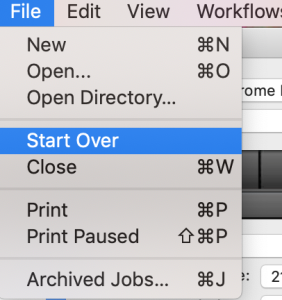
previous print jobs is no longer required. Changes to the settings dialog, e.g., adjustment/positioning of images, can now also be undone step by step as required. For instance, if you want to remove all files from the Mirage window without closing Mirage itself, you can use the menu item “File ⇒ Start Over”. As a result, not only are all copies removed from the printable area, but also all loaded documents.


5) Improved print preview

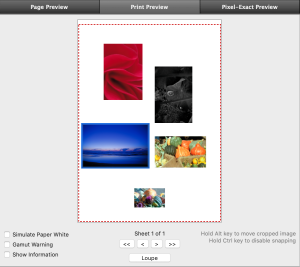
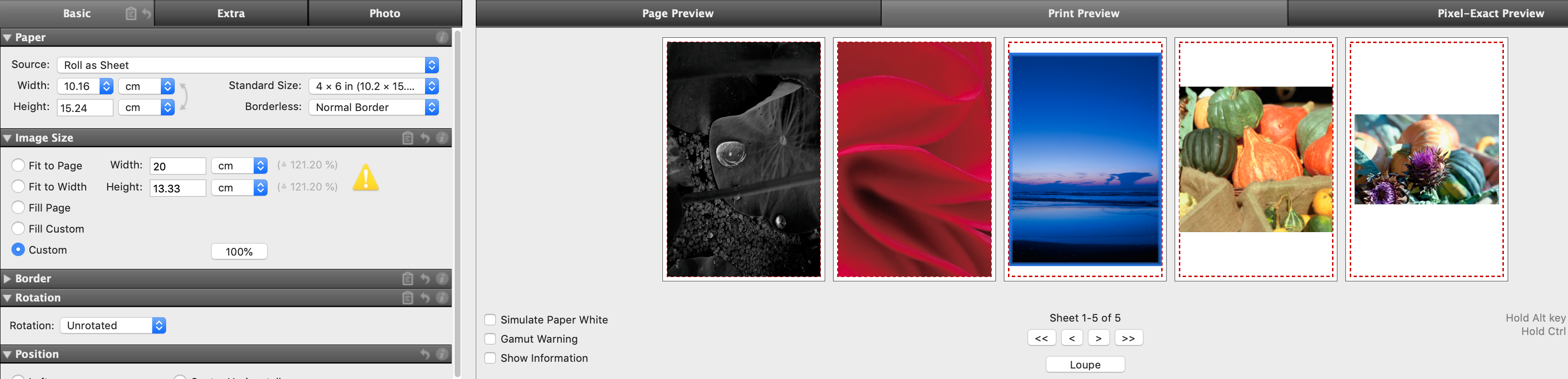
The clear print preview now always shows all print pages beside each other in a scrollable area. You can use the buttons “<<”, “<”, “>”, “>>” to move forward or back or to the start/end of the pages.


6) File & Templates browser

The File & Templates browser offers a much improved overview of uploaded image files and new templates. You can select, place, search, and change image files in the preview size as required. In addition, the “Filter” function offers a quick search, e.g., according to “already placed”, “not placed”, “portrait”, “landscape”, etc. Further images or templates can be placed into the printable area via drag and drop.


7) Multiple print jobs at the same time

With Mirage 5, for the first time, you can create as many print j obs as you want and prepare them separately. You can create a new print job via “File –> New” in the menu bar. Of course, you can also delete jobs that you have started, or that have already been printed. The new flexibility allows you to “pause” more complex jobs during t heir preparation in order to quickly print another file “in the meantime”.


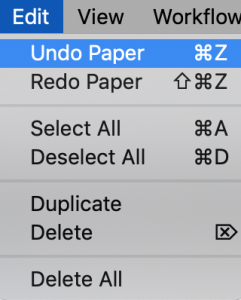
8) “Undo/Redo” function

The last changes applied (e.g., in the settings dialog or by manually moving an image in the layout) can be undone as required. To this end, use the corresponding entries in the“ Edit” menu or the standard keyboard shortcuts (e.g.,“ Ctrl Z” & “Shift Ctrl Z”). Once a print job is sent, the “Print” button changes to “Print Again” provided that no changes have been made.


9) Improved handling/placement of embedded logos

If you want to integrate your own logos into print files, you can scale and freely move the logos in the print and page preview simply using your mouse. To this end, place the cursor over a manually embedded logo in order to display/use the corresponding “handles”.


10) New tools for image editing

Blur
There is a new panel under the “Photo” tab if you want to apply Gaussian “blurring” to images.
Please use the “Pixel-Exact Preview” to properly assess the strength of the effect.
Drop Shadow
The new panel is located under the “Extra” tab. Images can be printed with a drop shadow. You can choose the color of the shadow using a color chooser or pipet (as with colored borders). The drop shadow parameters can be set using sliders:
• Opacity
• Direction (in degrees, relative to the rotated image, i.e., the alignment of the shadow stays the
same even if the image is printed with rotation)
• Softness of the shadow
• Offset between shadow and image


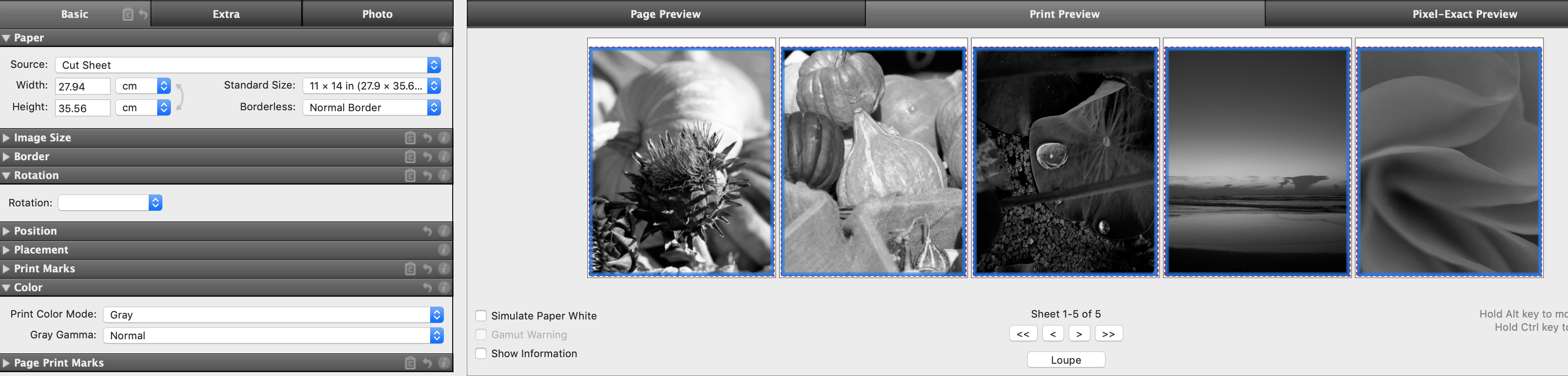
11) New print mode “Only Black Ink”

Some printer models offer a “Black” print mode. When you use this mode, only black ink (no gray ink) is used in the print job. This mode is only available with certain printer models and with certain paper/ink combinations.


12) Settings option “Simulation”

For special applications, experienced users may want to be able to simulate on their printer how the print will look on another printer, for example. This “proofing” function, as it is known, is now a component of all Mirage 5 versions. The “Simulation” settings option can be found under the “Extra” tab. You can select all CMYK profiles available on your system as simulation profiles.


13) Additional print marks

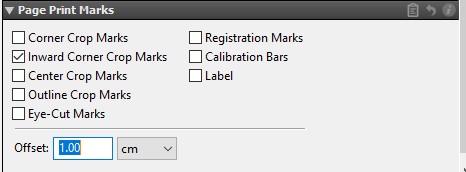
In the “Print Marks” settings menu, you have the option of moving crop marks “inwards” via “Inset…” to help prevent white overlaps. In the new menu “Page Print Marks”, Mirage 5 allows you to create marks for the entire spread in addition to the usual print marks (crop marks per image, etc.). If, for example, two images are placed on the spread, then the new page print marks, will be placed precisely around these two images. Of course, the gaps to the image can be set according to individual requirements.
The settings option “Page Print Marks” is hidden by default and can be made visible by right-clicking on the settings groups.


14) Support for current operating systems

Mirage 5 supports current operating systems such as macOS 13 (Ventura), Windows 11, and Adobe CC 2023. To install Mirage 5, your computer must run on Windows 10 or macOS High Sierra at minimum. For more information on Mirage 5 and affordable upgrades from Mirage 4 to the current version, please visit our website: dinax.com

Important note: Support for Mirage 4.x will end on 12/31/2023!

What does Mirage do?

Mirage sets milestones, defining new levels in print quality, ease of use and productivity. The intuitive user interface enables you to work fast and efficiently as a native plug-in Mirage offers everything, as it should be; smooth and perfectly scaled gradients, fonts and embedded vector graphics.

Who can use Mirage?

Mirage is developed, optimised and used by photographers, fine art printers, print service providers, graphic designers, marketing agencies, layout designers, packaging designers and professional amateurs. Mirage offers professional and “Prosumer” functionality, all at a cost-effective price point.

Real performance, no hidden costs

The intuitive Mirage user-interface enables you to work fast and efficiently. As native plug-in Mirage offers everything, as it should be: smooth and perfectly scaled gradients, fonts and embedded vector graphics. Mirage comes as plug-in for: Adobe™ Photoshop™, Adobe™ Photoshop™ Elements, Adobe™ InDesign™, Adobe™ Illustrator™ and Adobe ™ Lightroom or as a stand-alone droplet based application.

There are no hidden costs for different printer sizes; Mirage allows printing to multiple printers at the same time. Last but not least; We offer a very fair price policy when it comes to upgrades and cross-grades. Mirage‘s modular extensions are a cost-effective approach to expanding its functionality.


Perfect print quality – fast and efficient

Work faster and more efficiently with the most advanced professional print-plug-in for Adobe™ Photoshop™, Illustrator™, InDesign™ or Photoshop™ Elements. In addition, the Mirage Stand-Alone application allows printing of native PDF, JPEG and TIFF files without any host application being required. Simply drag PDF, JPEG or TIFF files or folders with mixed content of supported file formats to the Mirage application ‘Droplet’ icon and the intuitive Mirage user interface opens instantly. All media and printer specific settings can be stored, enabling a simple way to handle multiple workflows and printing environments. Mirage makes printing easy and secure by displaying the clear alignment of all necessary printing settings in one window. Press the “Print” button and thanks to the MZTP™ Technology*, your print will start within seconds. The Mirage Stand-Alone application is part of
all Mirage versions.

Manage your Print Jobs

The Mirage Jobs-Archive enables you to manage already processed jobs perfectly. By simply pressing the Print button, all Jobs stored within the archive can be printed again at any time.
The Mirage Jobs Archive is ideal not only for an uncomplicated reprint, for example of editions of your works, it also allows you, as a Print Service Provider, to make test prints for customers and recreate those prints after his final approval in any quantity requested.


See what Mirage can do for you

1. Image editing directly in Mirage
2. User-friendly settings dialog
3. Adjustment of image sharpness
4. Full 16-bit support of print data
5. The new “Loupe” zoom function
6. Pixel-accurate print preview
7. Support of Photoshop filters
8. Faster print preview
9. Real 64-bit structure even on Mac
10. Improved workflow for droplets
11. Optimized print dialog
12. Support of additional PRO add-on measurement modes
13. Chroma Optimizer selection for Canon PRO printers
14. Loading of custom media
15. Full support of LAB color space


Are you still using Mirage 4?

Visit our shop and upgrade your license to Mirage5.


1) Image Editing Directly in Mirage

Image editing in Mirage can be especially helpful if you open Mirage as a standalone program and therefore do not have access to the image editing functions in Photoshop or Lightroom, for example. All image edits you do in Mirage are non-destructive, i.e. they can be undone at any time and do not change the actual files. Another important advantage of editing images in Mirage is that the setting can be automated using droplets” or “stored settings.” More information on this can be found in the manual.

The following functions are just some of those available:

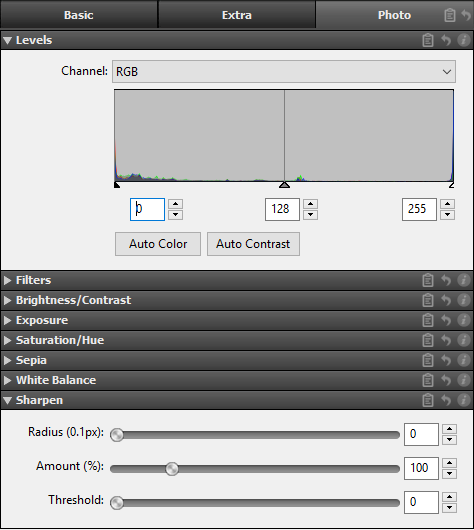
“Auto Color” adjusts the RGB values to a level that appears optimal for all images. This will not result in color shifts.

“Auto Contrast” adjusts the RGB values separately in order to produce an optimal value spread for each of the three channels. This may result in color shifts. There are also other configuration options for exposure, brightness/contrast, saturation/hue, sepia, and white balance.

You can find the new image editing options in the “Photo” menu of the print dialog.


2) User-Friendly Settings Dialog

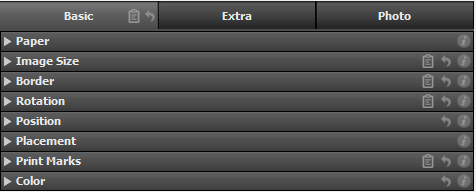
Mirage is now even more user-friendly! All of the settings in the print dialog have been divided into three logical configuration groups. The most common print settings, such as the paper source and image size, placement on the print medium, and print markings, can be found in the “Basic” tab. The “Extra” tab contains more specific, but more rarely used settings like “Crop,” “Logo Overlay,” and “Tiles” as well as print job management. The “Photo” menu provides all of the new image editing settings.


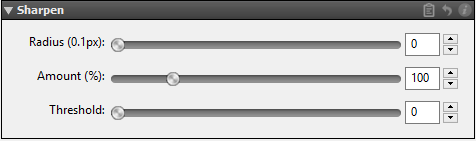
3) Adjustment of Image Sharpness

Mirage now provides the option of adjusting image sharpness immediately before printing. This filter works like the “Unsharp Mask” filter in Photoshop and is a powerful tool. You can find the option for adjusting sharpness in the “Photo” menu of the print dialog. What do the individual settings mean? The “Radius” controller determines how  many pixels around a particular pixel are analyzed. The “Threshold” controller defines a percentage from which differences to neighboring pixels are detected. The contrast is increased for all detected pixels. As a result, bright pixels become a little brighter, and dark pixels a little darker. The “Amount” controller determines how much contrast is added, based on the two previously defined values.


4) Full 16-Bit Support of Print Data

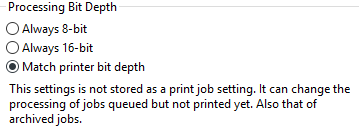
Mirage 4 internally uses a completely new image data calculation with full (end-to-end) 16-bit support. Even 8-bit image files can be processed at 16-bit precision. The printer receives the final print data at the maximum possible precision. The desired bit depth can be set in the “Settings…” menu under “Advanced.” This setting is not stored with the print job and can therefore be changed at a later point – in the Job Archive, for example – if a print job needs to be printed again. In the paper selection menu, “with” indicates which image data calculation your printer is using on the medium.


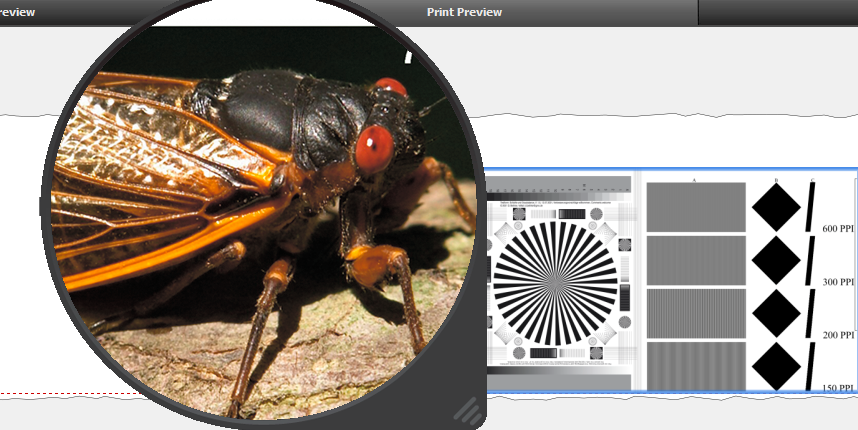
5) The "Loupe" Zoom Function

You can use the “Loupe” to view a pixel-accurate print preview at any time, even in the actual print preview, for example. The loupe zooms in to show the actual pixel-accurate print size, regardless of the display size in the Mirage window.
This zoom to 100% of the print data enables optimal control of the sharpness, resolution, and image depth of the actual print. The area shown in the loupe also contains the effects of any image editing done in Mirage. (See section 1, 3, and 7.)


6) Pixel-Accurate Print Preview

The new “Pixel-Accurate Preview” shows an actual print resolution, including all of the applied image and color management settings.


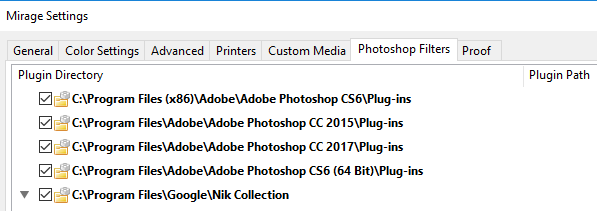
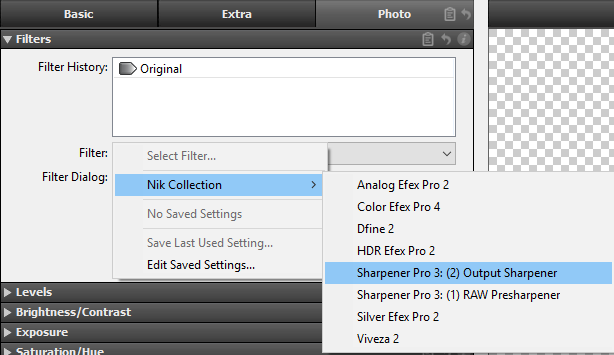
7) Support of Photoshop Filters

Mirage 4 allows for the use of Photoshop filters (tested with Google© Nik filters, for example). To apply the filters, go to the Mirage print dialog and select “Photo” and then “Filter.” Then simply choose the filter and click on “Apply Selected Filter” to activate it.

While filters in Photoshop can only ever be applied to one image, Mirage allows you to apply the filters to multiple images. The filters you select are always applied to the files loaded in Mirage which you selected.


If you choose “Show for a selected document” the filter dialog is opened one time for one file and then applied to the previously selected files. Selecting “Show for each selected document” opens the filter dialog for every file but not for copies of the files. Selecting “Show for each selected copy” opens the filter dialog for all files, even copies.

Tip: Variations of the same image can be given different filter settings. “Don’t show”: If a stored filter setting is selected, filters are applied without the filter dialog being opened. Please note: In the case of filters that cannot be automated in Photoshop, Mirage will only display the option “Show for each selected document”, as these filter settings cannot be saved. As with all other functions, Photoshop filters can also be used as a “Stored Setting” for automatic processes. This allows several filters to be applied in sequence, for example, even during automatic processes.


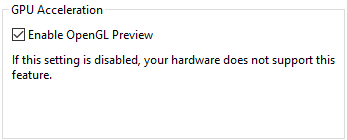
8) Faster Print Preview

Thanks to OpenGL support, image editing functions are displayed more quickly. Naturally your computer must support OpenGL.


9) Real 64-Bit Structure Even on Mac

Both the “standalone” Mirage program and the Mirage plug-ins are native 64-bit applications. This significantly improves the simultaneous opening of many files or exceptionally large files.


10) Improved Workflow for Droplets

Droplets enable automated workflows. If you have generated a droplet and then drag files to a droplet while the print dialog is already open, the droplet settings are then automatically applied to the new files. If the printer and paper, for example, are already stored in the droplet, these saved settings are applied and the previously selected settings are overwritten.
Our tip: Droplets created in Mirage 3 can also be used in Mirage 4 (by double-clicking). More information on droplets can be found in the manual.


11) Optimized Print Dialog

Printers or new media can now be added directly in the main window if desired. The “on” selection menu now shows a submenu containing the loaded medium. Since some paper types are unfortunately given the same media ID by the printer manufacturers in some cases, several media are sometimes displayed for selection at this point. Please choose which medium is loaded. If the medium selected in Mirage differs from the medium loaded in the printer, a yellow warning triangle is displayed. This helps prevent print errors.

We have also revised the printer wizard in Mirage 4. The new wizard now lists all printers that are detected and supported. You can still add printers in the printer wizard like before using the “Add manually” button. The “Standard Sizes” menu shows the roll width determined by the printer. A yellow warning triangle next to the paper display indicates that the width set manually in Mirage does not match the width determined
by the printer.


13) Chroma Optimizer Selection

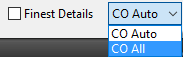
When a Canon printer with Chroma Optimizer is used/selected, the “Mirage Print” main window contains an additional selection field, “Chroma Optimizer,” next to the “Finest Details” field.

The following settings are available:

CO Auto: Chroma Optimizer is applied wherever there is ink.

CO everywhere: Chroma Optimizer is applied to the entire printable area (not including print margins).


14) Loading of Custom Media

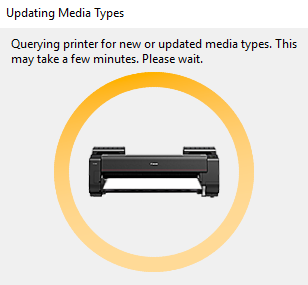
Some printers (especially the Epson SureColor SC-S and the Canon PRO series) provide the option of storing settings for (custom) media directly in the printer. When Mirage is launched or if you switch to one of these printers within Mirage, Mirage attempts to query the information on media stored there or update changes.

Communication between Mirage and the printer is indicated by the spinning orange circle, which turns green when successful and red when something goes wrong with the query. This process may take some time depending on the number of loaded media. Media which were loaded from a printer in this way are shown in the “Settings…” menu under “Custom Media” with “@Your Printer” as a suffix.


15) Full Support of LAB Color Space

In addition to RGB and CMYK data, Mirage now supports files that were created in the LAB color space.


Print Materials
About the Artist
Shipping

We strive to process and ship all orders in a timely manner, working diligently to ensure that your items are on their way to you as soon as possible.

  • Prints are made on demand and are usually printed and shipped within 2-3 days
  • Delivery may take 8-10 days in Australia by Regular Post and 2-4 days by Express Post
  • Prints A3 and under are shipped flat and packed safely between card
  • Larger Prints are Shipped in a tube for safety
Returns Policy

If not 100% satisfied with your artwork purchase, return within 30 days for a full refund

Free Shipping on Orders over $75

For orders shipped Regular Post in Australia. Express service available for an additional fee

30 Day Peace of Mind

For your peace of mind, if you are not 100% satisfied with your purchase, return within 30 Days for a full refund.

More by this Artist or similar...

World Class Print Technology

Archival Pigment Inks

Our prints are made using a series of Epson professional large format printers with Ultrachorme HD Inks

Premium Meaterials from Industry Leaders

Archival Grade Materials

We use papers that are 100% cotton, pH buffered and meet archival standards for our prints. Our canvas is a cotton/poly blend for maximum stability and longevity.

Full gamut is a certified Canson Print Lab and an Ilford Certified Print Partner, given out to print services that provide only the highest standards.

Packaged with Care

Secure and Safe Delivery

Prints are wrapped in tissue and shipped in sturdy cardboard or PVC tubes. Smaller items can be flat packed.

Standard or express delivery is available.

Why Trust Full Gamut - in their own words....

V

Virginia

Full Gamut were recently involved in printing a fine art series for bruny NORTH. The print quality was absolutely excellent as was their general artisan approach to the job, their amazing attention to detail and genuine interest in the process and outcome was very appreciated.

It was such a joy to work with the whole team at Full Gamut, we will be seeing a lot of them in the future!

K

Keri

Full Gamut was absolutely fantastic. The staff were friendly and helpful, the quality of reproduction was great, and the speed with which they did the job was exactly what was needed. I can’t recommend them highly enough.

R

Rudi

Very impressed with the service and quality of my prints! I can highly recommend them and will be using the again for all future prints!

L

Lachlan

Amazing level of customer service. I am someone who has worked in customer service for over a decade and the level of care and service was by far the best I have received in a long time.

C

Christine

Full Gamut deserve 5 plus stars. They understood my photo printing needs when another printing “service” did not care. Customer service second to none.

P

Paul

I was told by many people to use full gamut for the best quality prints and professional service. I can say they were all right, the expert advice made it easy to decide which paper and size and were happy to take the time to explain differences in various products.

I can see myself using their services again in the future.

T

Travis

I can not recommend Full Gamut enough! The quality of print is just amazing!! Wonderful colours, deep shades and the feel of the print is 110% Spot on!!
If you are needing some amazing quality prints i recommend using Full Gamut over any other printing service in Tasmania!

Keep up the amazing work guys and i look forward to working with you more on future projects!

E

Emma

Cried with joy when I received my prints, I couldn’t be happier with the results and the service. Thankyou so so so much!

H

Helen

Absolutely amazing customer service! They really nailed it with the digital colour reproductions of my art. Can't say enough about how fantastic they are with everything they did for me.

Add on to that and they have been very helpful with printing and dispatching purchased art to clients as well.

R

Robyn

Very grateful for the fast delivery of my purchase so close to Xmas .
Delivered to my letter box saving me a trip to the post office.

On going emails saying where & how many days always was very much appreciated
Thank you Full Gamut
Someone that l can fully trust

V

Virginia

Full Gamut were recently involved in printing a fine art series for bruny NORTH. The print quality was absolutely excellent as was their general artisan approach to the job, their amazing attention to detail and genuine interest in the process and outcome was very appreciated.

It was such a joy to work with the whole team at Full Gamut, we will be seeing a lot of them in the future!

K

Keri

Full Gamut was absolutely fantastic. The staff were friendly and helpful, the quality of reproduction was great, and the speed with which they did the job was exactly what was needed. I can’t recommend them highly enough.

R

Rudi

Very impressed with the service and quality of my prints! I can highly recommend them and will be using the again for all future prints!

L

Lachlan

Amazing level of customer service. I am someone who has worked in customer service for over a decade and the level of care and service was by far the best I have received in a long time.

C

Christine

Full Gamut deserve 5 plus stars. They understood my photo printing needs when another printing “service” did not care. Customer service second to none.

P

Paul

I was told by many people to use full gamut for the best quality prints and professional service. I can say they were all right, the expert advice made it easy to decide which paper and size and were happy to take the time to explain differences in various products.

I can see myself using their services again in the future.

T

Travis

I can not recommend Full Gamut enough! The quality of print is just amazing!! Wonderful colours, deep shades and the feel of the print is 110% Spot on!!
If you are needing some amazing quality prints i recommend using Full Gamut over any other printing service in Tasmania!

Keep up the amazing work guys and i look forward to working with you more on future projects!

E

Emma

Cried with joy when I received my prints, I couldn’t be happier with the results and the service. Thankyou so so so much!

H

Helen

Absolutely amazing customer service! They really nailed it with the digital colour reproductions of my art. Can't say enough about how fantastic they are with everything they did for me.

Add on to that and they have been very helpful with printing and dispatching purchased art to clients as well.

R

Robyn

Very grateful for the fast delivery of my purchase so close to Xmas .
Delivered to my letter box saving me a trip to the post office.

On going emails saying where & how many days always was very much appreciated
Thank you Full Gamut
Someone that l can fully trust

V

Virginia

Full Gamut were recently involved in printing a fine art series for bruny NORTH. The print quality was absolutely excellent as was their general artisan approach to the job, their amazing attention to detail and genuine interest in the process and outcome was very appreciated.

It was such a joy to work with the whole team at Full Gamut, we will be seeing a lot of them in the future!

K

Keri

Full Gamut was absolutely fantastic. The staff were friendly and helpful, the quality of reproduction was great, and the speed with which they did the job was exactly what was needed. I can’t recommend them highly enough.

R

Rudi

Very impressed with the service and quality of my prints! I can highly recommend them and will be using the again for all future prints!

L

Lachlan

Amazing level of customer service. I am someone who has worked in customer service for over a decade and the level of care and service was by far the best I have received in a long time.

C

Christine

Full Gamut deserve 5 plus stars. They understood my photo printing needs when another printing “service” did not care. Customer service second to none.

P

Paul

I was told by many people to use full gamut for the best quality prints and professional service. I can say they were all right, the expert advice made it easy to decide which paper and size and were happy to take the time to explain differences in various products.

I can see myself using their services again in the future.

T

Travis

I can not recommend Full Gamut enough! The quality of print is just amazing!! Wonderful colours, deep shades and the feel of the print is 110% Spot on!!
If you are needing some amazing quality prints i recommend using Full Gamut over any other printing service in Tasmania!

Keep up the amazing work guys and i look forward to working with you more on future projects!

E

Emma

Cried with joy when I received my prints, I couldn’t be happier with the results and the service. Thankyou so so so much!

H

Helen

Absolutely amazing customer service! They really nailed it with the digital colour reproductions of my art. Can't say enough about how fantastic they are with everything they did for me.

Add on to that and they have been very helpful with printing and dispatching purchased art to clients as well.

R

Robyn

Very grateful for the fast delivery of my purchase so close to Xmas .
Delivered to my letter box saving me a trip to the post office.

On going emails saying where & how many days always was very much appreciated
Thank you Full Gamut
Someone that l can fully trust

V

Virginia

Full Gamut were recently involved in printing a fine art series for bruny NORTH. The print quality was absolutely excellent as was their general artisan approach to the job, their amazing attention to detail and genuine interest in the process and outcome was very appreciated.

It was such a joy to work with the whole team at Full Gamut, we will be seeing a lot of them in the future!

K

Keri

Full Gamut was absolutely fantastic. The staff were friendly and helpful, the quality of reproduction was great, and the speed with which they did the job was exactly what was needed. I can’t recommend them highly enough.

R

Rudi

Very impressed with the service and quality of my prints! I can highly recommend them and will be using the again for all future prints!

L

Lachlan

Amazing level of customer service. I am someone who has worked in customer service for over a decade and the level of care and service was by far the best I have received in a long time.

C

Christine

Full Gamut deserve 5 plus stars. They understood my photo printing needs when another printing “service” did not care. Customer service second to none.

P

Paul

I was told by many people to use full gamut for the best quality prints and professional service. I can say they were all right, the expert advice made it easy to decide which paper and size and were happy to take the time to explain differences in various products.

I can see myself using their services again in the future.

T

Travis

I can not recommend Full Gamut enough! The quality of print is just amazing!! Wonderful colours, deep shades and the feel of the print is 110% Spot on!!
If you are needing some amazing quality prints i recommend using Full Gamut over any other printing service in Tasmania!

Keep up the amazing work guys and i look forward to working with you more on future projects!

E

Emma

Cried with joy when I received my prints, I couldn’t be happier with the results and the service. Thankyou so so so much!

H

Helen

Absolutely amazing customer service! They really nailed it with the digital colour reproductions of my art. Can't say enough about how fantastic they are with everything they did for me.

Add on to that and they have been very helpful with printing and dispatching purchased art to clients as well.

R

Robyn

Very grateful for the fast delivery of my purchase so close to Xmas .
Delivered to my letter box saving me a trip to the post office.

On going emails saying where & how many days always was very much appreciated
Thank you Full Gamut
Someone that l can fully trust

V

Virginia

Full Gamut were recently involved in printing a fine art series for bruny NORTH. The print quality was absolutely excellent as was their general artisan approach to the job, their amazing attention to detail and genuine interest in the process and outcome was very appreciated.

It was such a joy to work with the whole team at Full Gamut, we will be seeing a lot of them in the future!

K

Keri

Full Gamut was absolutely fantastic. The staff were friendly and helpful, the quality of reproduction was great, and the speed with which they did the job was exactly what was needed. I can’t recommend them highly enough.

R

Rudi

Very impressed with the service and quality of my prints! I can highly recommend them and will be using the again for all future prints!

L

Lachlan

Amazing level of customer service. I am someone who has worked in customer service for over a decade and the level of care and service was by far the best I have received in a long time.

C

Christine

Full Gamut deserve 5 plus stars. They understood my photo printing needs when another printing “service” did not care. Customer service second to none.

P

Paul

I was told by many people to use full gamut for the best quality prints and professional service. I can say they were all right, the expert advice made it easy to decide which paper and size and were happy to take the time to explain differences in various products.

I can see myself using their services again in the future.

T

Travis

I can not recommend Full Gamut enough! The quality of print is just amazing!! Wonderful colours, deep shades and the feel of the print is 110% Spot on!!
If you are needing some amazing quality prints i recommend using Full Gamut over any other printing service in Tasmania!

Keep up the amazing work guys and i look forward to working with you more on future projects!

E

Emma

Cried with joy when I received my prints, I couldn’t be happier with the results and the service. Thankyou so so so much!

H

Helen

Absolutely amazing customer service! They really nailed it with the digital colour reproductions of my art. Can't say enough about how fantastic they are with everything they did for me.

Add on to that and they have been very helpful with printing and dispatching purchased art to clients as well.

R

Robyn

Very grateful for the fast delivery of my purchase so close to Xmas .
Delivered to my letter box saving me a trip to the post office.

On going emails saying where & how many days always was very much appreciated
Thank you Full Gamut
Someone that l can fully trust

V

Virginia

Full Gamut were recently involved in printing a fine art series for bruny NORTH. The print quality was absolutely excellent as was their general artisan approach to the job, their amazing attention to detail and genuine interest in the process and outcome was very appreciated.

It was such a joy to work with the whole team at Full Gamut, we will be seeing a lot of them in the future!

K

Keri

Full Gamut was absolutely fantastic. The staff were friendly and helpful, the quality of reproduction was great, and the speed with which they did the job was exactly what was needed. I can’t recommend them highly enough.

R

Rudi

Very impressed with the service and quality of my prints! I can highly recommend them and will be using the again for all future prints!

L

Lachlan

Amazing level of customer service. I am someone who has worked in customer service for over a decade and the level of care and service was by far the best I have received in a long time.

C

Christine

Full Gamut deserve 5 plus stars. They understood my photo printing needs when another printing “service” did not care. Customer service second to none.

P

Paul

I was told by many people to use full gamut for the best quality prints and professional service. I can say they were all right, the expert advice made it easy to decide which paper and size and were happy to take the time to explain differences in various products.

I can see myself using their services again in the future.

T

Travis

I can not recommend Full Gamut enough! The quality of print is just amazing!! Wonderful colours, deep shades and the feel of the print is 110% Spot on!!
If you are needing some amazing quality prints i recommend using Full Gamut over any other printing service in Tasmania!

Keep up the amazing work guys and i look forward to working with you more on future projects!

E

Emma

Cried with joy when I received my prints, I couldn’t be happier with the results and the service. Thankyou so so so much!

H

Helen

Absolutely amazing customer service! They really nailed it with the digital colour reproductions of my art. Can't say enough about how fantastic they are with everything they did for me.

Add on to that and they have been very helpful with printing and dispatching purchased art to clients as well.

R

Robyn

Very grateful for the fast delivery of my purchase so close to Xmas .
Delivered to my letter box saving me a trip to the post office.

On going emails saying where & how many days always was very much appreciated
Thank you Full Gamut
Someone that l can fully trust

V

Virginia

Full Gamut were recently involved in printing a fine art series for bruny NORTH. The print quality was absolutely excellent as was their general artisan approach to the job, their amazing attention to detail and genuine interest in the process and outcome was very appreciated.

It was such a joy to work with the whole team at Full Gamut, we will be seeing a lot of them in the future!

K

Keri

Full Gamut was absolutely fantastic. The staff were friendly and helpful, the quality of reproduction was great, and the speed with which they did the job was exactly what was needed. I can’t recommend them highly enough.

R

Rudi

Very impressed with the service and quality of my prints! I can highly recommend them and will be using the again for all future prints!

L

Lachlan

Amazing level of customer service. I am someone who has worked in customer service for over a decade and the level of care and service was by far the best I have received in a long time.

C

Christine

Full Gamut deserve 5 plus stars. They understood my photo printing needs when another printing “service” did not care. Customer service second to none.

P

Paul

I was told by many people to use full gamut for the best quality prints and professional service. I can say they were all right, the expert advice made it easy to decide which paper and size and were happy to take the time to explain differences in various products.

I can see myself using their services again in the future.

T

Travis

I can not recommend Full Gamut enough! The quality of print is just amazing!! Wonderful colours, deep shades and the feel of the print is 110% Spot on!!
If you are needing some amazing quality prints i recommend using Full Gamut over any other printing service in Tasmania!

Keep up the amazing work guys and i look forward to working with you more on future projects!

E

Emma

Cried with joy when I received my prints, I couldn’t be happier with the results and the service. Thankyou so so so much!

H

Helen

Absolutely amazing customer service! They really nailed it with the digital colour reproductions of my art. Can't say enough about how fantastic they are with everything they did for me.

Add on to that and they have been very helpful with printing and dispatching purchased art to clients as well.

R

Robyn

Very grateful for the fast delivery of my purchase so close to Xmas .
Delivered to my letter box saving me a trip to the post office.

On going emails saying where & how many days always was very much appreciated
Thank you Full Gamut
Someone that l can fully trust

V

Virginia

Full Gamut were recently involved in printing a fine art series for bruny NORTH. The print quality was absolutely excellent as was their general artisan approach to the job, their amazing attention to detail and genuine interest in the process and outcome was very appreciated.

It was such a joy to work with the whole team at Full Gamut, we will be seeing a lot of them in the future!

K

Keri

Full Gamut was absolutely fantastic. The staff were friendly and helpful, the quality of reproduction was great, and the speed with which they did the job was exactly what was needed. I can’t recommend them highly enough.

R

Rudi

Very impressed with the service and quality of my prints! I can highly recommend them and will be using the again for all future prints!

L

Lachlan

Amazing level of customer service. I am someone who has worked in customer service for over a decade and the level of care and service was by far the best I have received in a long time.

C

Christine

Full Gamut deserve 5 plus stars. They understood my photo printing needs when another printing “service” did not care. Customer service second to none.

P

Paul

I was told by many people to use full gamut for the best quality prints and professional service. I can say they were all right, the expert advice made it easy to decide which paper and size and were happy to take the time to explain differences in various products.

I can see myself using their services again in the future.

T

Travis

I can not recommend Full Gamut enough! The quality of print is just amazing!! Wonderful colours, deep shades and the feel of the print is 110% Spot on!!
If you are needing some amazing quality prints i recommend using Full Gamut over any other printing service in Tasmania!

Keep up the amazing work guys and i look forward to working with you more on future projects!

E

Emma

Cried with joy when I received my prints, I couldn’t be happier with the results and the service. Thankyou so so so much!

H

Helen

Absolutely amazing customer service! They really nailed it with the digital colour reproductions of my art. Can't say enough about how fantastic they are with everything they did for me.

Add on to that and they have been very helpful with printing and dispatching purchased art to clients as well.

R

Robyn

Very grateful for the fast delivery of my purchase so close to Xmas .
Delivered to my letter box saving me a trip to the post office.

On going emails saying where & how many days always was very much appreciated
Thank you Full Gamut
Someone that l can fully trust

Frequently asked questions

Where are your prints produced?

All our prints are produced in our studio in Hobart, Tasmania. We are a locally based business who take great pride and care in every aspect of our production from printer calibration to paper choice and final output.

What print process do you use to make prints?

Our prints are produced on Epson professional large format printers. Inks used are the UltraChrome Pro archival pigment inkset with either 10 or 12 inks. Designed for maximum colour range and fade resistance. This is mong the longest lasting print systems available today.

This print type is sometimes refered to as Giclée printing.The term "giclée" is derived from the French word "gicleur," meaning "to spray," which refers to the process of tiny ink droplets being sprayed onto the printing surface. This process results in prints with exceptional color accuracy, detail, and longevity, making them a popular choice for fine art reproductions.

What materials do you print on?

We only use well established and internationally recognised brands in producing our prints.

Manufacturers we use include Canson Infinity, Hahnemühle Fine Art and Ilford Galerie.

Papers are chosen in collaboration with our artists. They are typically 300gsm (unless otherwise requested by the artist). We favour 100% cotton papers and cotton/poly blend canvas for maximum longevity.

Do you print for anyone or just your artists?

Yes, we are a fine art and production print company and welcome work from the general public, professionals and artists of all types. Visit the Full Gamut main website for our full services. fullgamut.com.au

Can my artwork choice be framed?

Yes, we have a full picture framing studio on-site and access to the full range of picture framing materials and processes. Reach out to us with any specific needs or ideas and we will create a custom framing quote for you.

When will I get my order?

Works are printed on demand and are usually printed within 24-48 hours of the order being received.

We will work quickly to ship your order as soon as possible. If the work you have ordered is a limited edition work to be signed by the artist, this may delay shipping until the artist can come to the studio.

Once your order has shipped, you will receive an email with further information. Delivery times vary depending on your location. Typical delivery times in Australia will be 4-7 days.

How much does shipping cost?

Shipping for orders over $75 is free within Australia

Shipping is calculated based on your location and the items in your order. You will always know the shipping price before you purchase.

What is the return policy?

Our goal is for every customer to be totally satisfied with their purchase. If this isn’t the case and you are not 100% satisfied with your purchase, return it to us within 30 days for a full refund.

Search